
It was 9 AM on a Monday. I had my coffee. I was ready.
The task: build a complete online booking system for a single doctor – with calendar sync, patient registration, and a payment gateway. The doctor had been seeing patients offline for 15 years. Now he wanted to offer online appointments. Simple enough, right?
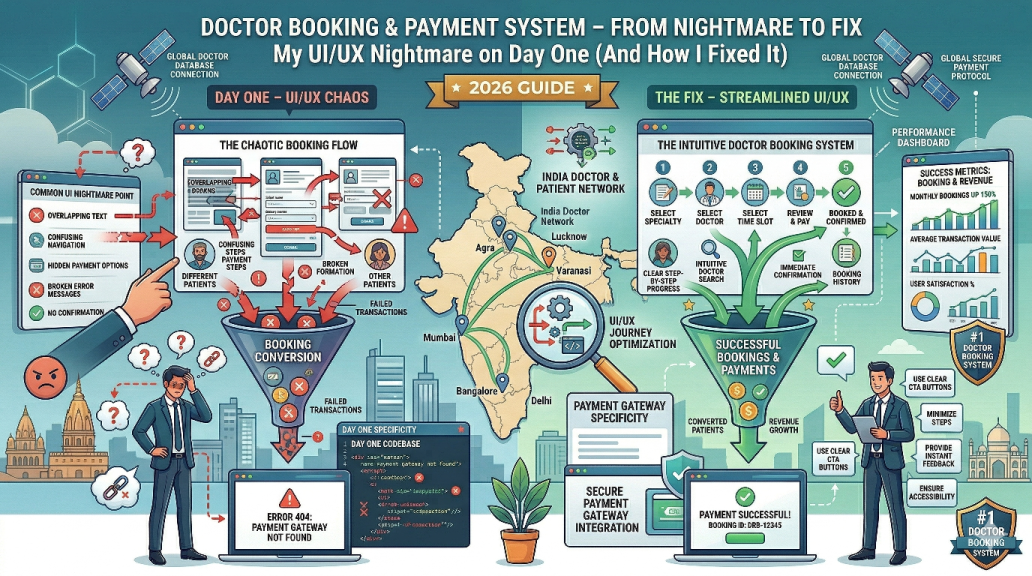
By 5 PM, I was staring at my screen, wondering why the calendar picker felt clunky, why patients were getting confused, and why the payment button seemed to hide on mobile. My first day was a disaster. But what I learned that day changed how we build every healthcare system at SYNOR.
I’m Shashwat, lead developer at SYNOR. In this post, I’ll walk you through the real challenges of building a doctor booking system – from UI/UX nightmares to payment gateway headaches – and how we solved them. If you’re a doctor in Varanasi, Jhansi, or Lucknow thinking about going online, this is for you.
The project that broke my assumptions
The doctor – let’s call him Dr. Sharma – wanted a simple site where patients could:
- See available time slots
- Book an appointment
- Pay online (₹500 consultation fee)
- Get a confirmation email/SMS
We’ve built complex e‑commerce sites. We’ve built affiliate platforms. How hard could this be?
Famous last words.
Hour 1: The calendar disaster
I started with a standard date picker. You know the one – a little calendar icon, you click, you pick a date. On desktop, it worked fine. But when I tested on my phone, the touch targets were tiny. Patients with larger fingers would accidentally tap the wrong date. And the time slot dropdown? Even worse.
One patient in our test group said, “I can’t figure out which slot is free.” Another asked, “Where do I click?”
I realised: a booking system isn’t just about functionality. It’s about reducing friction. Every extra click, every confusing label, every tiny button – it all increases the chance that the patient gives up and calls a competitor.
We scrapped the standard picker and built a custom visual calendar. Available slots in green, booked in grey, today highlighted. Each slot was a large, tappable button. On mobile, we used a vertical list of time slots instead of a dropdown. The difference was night and day. Test patients started booking without asking for help.
This experience reinforced why mobile-friendly design is not optional – it’s essential.
Hour 3: The payment gateway puzzle
Next, I integrated a payment gateway (Razorpay). On the surface, it’s straightforward. Add a few lines of code, and you’re done. But then I thought: what if the payment fails? What if the patient pays but the booking doesn’t save? What if they close the browser mid‑payment?
These are called edge cases, and they will ruin your reputation if you ignore them.
I spent the next four hours building a webhook handler. Here’s how it works:
- Patient books a slot and clicks “Pay”.
- We temporarily reserve the slot for 15 minutes.
- Payment happens on Razorpay’s secure page.
- After success, Razorpay sends a confirmation to our server.
- We mark the slot as confirmed and send email/SMS to the patient.
- If payment fails, we release the slot and ask the patient to try again.
Without this, a patient could pay, but the system might show the slot as still available – leading to double bookings. Or a patient could book without paying, blocking a slot for someone else.
We’ve since used this pattern for e‑commerce estimate calculators and other booking systems. It’s now a standard part of our web development services.
Hour 6: The doctor’s dashboard – simplicity is hard
Dr. Sharma isn’t a tech person. He needs a dashboard that shows:
- Today’s appointments
- Upcoming appointments
- Patient details (name, phone, concerns)
- Payment status (paid, pending, failed)
My first design had too much information. Tables, filters, export buttons – it looked like an enterprise software. Dr. Sharma said, “I just want to see who’s coming today.”
I stripped it down. A clean list of today’s appointments. Each item shows patient name, time, and a green “paid” badge. A simple “view details” link. That’s it. Tomorrow’s appointments are one click away. Past appointments are in a separate tab.
This taught me: build for the user’s mental model, not for feature completeness. Dr. Sharma doesn’t need analytics. He needs to know who’s walking in next.
If you’re a doctor or clinic owner, see how we helped a dental clinic get 300% more leads with a simple, effective website.
What I learned (and how it changed our process)
That first day taught me three things that now guide every healthcare project we take on:
- Start with the patient’s journey, not the code. Map out every step a patient takes – from opening the site to getting a confirmation. Then remove steps. Then simplify again.
- Test on real phones, not just simulators. A desktop browser’s mobile view is not the same as a cheap Android phone on 4G. We now test on at least five real devices.
- Talk to the doctor like a human. Most developers build what they think the doctor needs. We sit with the doctor, watch them use a prototype, and listen to their frustrations. That’s how we discovered the dashboard problem.
These lessons apply to any business – not just doctors. Whether you’re a travel agent in Jhansi or a coaching centre in Lucknow, your website needs to work for your customers, not just look pretty.
How you can avoid my mistakes
If you’re a doctor planning to build a booking system, here’s my advice:
- Don’t settle for a generic plugin. Many WordPress booking plugins look okay but fail on mobile or don’t handle payments reliably. A custom solution is worth the investment.
- Think about failed payments. What happens if the payment fails but the slot is blocked? Or if the patient pays but doesn’t get a confirmation? Plan for these edge cases.
- Make it easy to reschedule. Patients will cancel or change times. Your system should allow that without a phone call.
- Integrate with the doctor’s existing calendar. If Dr. Sharma already uses Google Calendar, sync it. Don’t make him manage two calendars.
We’ve built several doctor booking systems since that first painful day. Each one is better than the last. We now offer a custom doctor booking module as part of our web development services. It includes:
- Custom calendar with availability management
- Razorpay/Stripe/PayU integration
- Automated email/SMS reminders
- Doctor dashboard (simple, clean)
- Patient management system
- Mobile‑first, fast loading
We’ve used this module for ayurvedic clinics, dental clinics, and even demo projects.
Ready to take your practice online?
If you’re a doctor in Varanasi, Jhansi, Lucknow, or anywhere in Uttar Pradesh, a booking system with payment gateway can transform your practice. No more phone tag. No more missed appointments. Just a simple, professional online experience for your patients.
We’d love to build it for you. Contact SYNOR today for a free consultation. We’ll discuss your needs, show you examples, and give you a clear timeline and price.
And if you’re still building your online presence, read our digital marketing guide for UP businesses to attract more patients.
Let’s build something that works – from day one.